In short
- EU rules require consumer prices to include VAT, so set each market's tax display in Shopify: Dynamic adds the customer's VAT to your net price, while a fixed catalog price is charged exactly as you set it.
- With stock in Sweden, add two registrations in Shopify's EU tax settings – your Swedish VAT number for orders within Sweden and an OSS registration for orders to other EU countries – mirroring your Swedish VAT return and your One Stop Shop return.
- Stores that weren't set up to collect EU tax before 13 May 2026 need Shopify Tax to use the OSS setting, and the €10,000 micro-business option is not for businesses established outside the EU.
- Orders shipped from stock already cleared in Sweden aren't imports, so there are no duties to collect at checkout – and Shopify can't combine OSS with IOSS for parcels you still send from outside the EU.
- Swedish shoppers must see prices in kronor, and Skatteverket wants One Stop Shop amounts in euros, so keep the amounts customers actually paid.
Shopify Markets decides which currency, prices and products each customer sees; your tax settings decide what VAT Shopify charges. The two have to agree. This guide connects them for brands from the US, Canada, Australia or the UK with stock in an EU warehouse – in our example, Sweden, where our warehouse is. It follows Shopify's Help Center as of October 2026, so check the labels in your own admin.
How does Shopify Markets work for selling in Europe?
A market is a group of customers – one country or several – with its own currency, catalog, prices and tax display. According to Shopify's requirements for Markets, creating regional markets is free on every plan, and only customers in an active market can check out.
For Europe, you have two basic options:
- One EU market. A multi-country market shows each country its local currency, converted from the market's base currency. One set of settings covers the EU.
- Separate markets. A single-country market, such as Sweden, gets its own currency, catalog and prices. A submarket inherits its parent market's settings, so a country can differ only where it needs to.
Three limits are worth knowing first. Selling in several currencies needs Shopify Payments or Adyen; with another payment processor, customers in every market pay in your store's default currency. Per-market theme customization needs the Advanced plan or higher. And Markets can only be activated for countries you have shipping rates for.
Markets decide what customers see. Where an order ships from decides how VAT works, so EU orders have to be fulfilled from your EU stock. Our page on Shopify fulfillment in Europe explains how orders, stock levels and tracking flow between your store and our warehouse.
Which currency should EU customers see in Shopify?
Their own. A single-country market is set to that country's currency automatically, and a multi-country market shows each country its local currency, according to Shopify's currency settings for markets. In practice, that means euros in the euro area and kronor in Sweden – where Swedish rules require prices for consumers to be stated in kronor, including VAT. Read what the krona means when you sell from Sweden.
Automatic or manual exchange rates?
With automatic rates, Shopify converts your prices at current market rates and builds its currency conversion fee into the price the customer sees. With manual rates, you fix the rate yourself and the fee comes out of your payout. On Shopify Payments, the fee applies when a customer pays in a currency other than your payout currency: as of October 2026, 1.5% for stores in the United States and 2% for stores in the UK, Canada, Australia and the European Economic Area. Rounding, switched on per market, turns a converted €9.73 into €10.00.
Presentment currency vs shop currency
Shopify records an order's totals in two currencies. In Shopify's API, the presentment amount is what the customer paid, in their currency, and the shop amount is the equivalent in your store's base currency. For VAT, the presentment amount is the one that counts. Skatteverket wants One Stop Shop amounts in euros, with sales in other currencies converted at the European Central Bank's rate for the last day of the quarter, and your Swedish sales are already in kronor. Give your accountant the amounts in the customer's currency, not figures already converted to your store currency.
Getting paid in euros
Selling in euros doesn't mean being paid in euros. Multi-Currency Payouts are available only on the Advanced and Plus plans. On other plans, all payouts are converted to your home currency. Which extra currencies you can add depends on where your store is based: a US store can add euros, but not kronor.
Do prices in the EU have to include VAT?
Yes, for consumers. The EU's Price Indication Directive defines the selling price as the final price including VAT and all other taxes. The Consumer Rights Directive requires online stores to give the total price inclusive of taxes, plus any delivery charges, before the customer is bound by the order. Shipping carries VAT too: under Article 78 of the EU VAT Directive, transport costs the seller charges the customer are part of the taxable amount.
In Shopify, you choose the tax display per market, in the market's duties and taxes settings:
- Dynamic includes tax where customers expect it, such as the EU, and leaves it out where they don't, such as the United States or Canada.
- Show as included shows your prices as they are, and you are responsible for setting prices that already include tax.
- Show as line item adds tax at checkout. That suits a US market, not EU consumers, who must see the VAT-inclusive price.
Shopify also has a store-wide setting, Include sales tax in product price and shipping rate, under Settings > Taxes and duties. It matters if your home prices already include tax, as a UK or Australian store's usually do: when you sell to another tax-inclusive country, Shopify deducts your home tax rate, based on your store address, before it applies the customer's rate.
Same price in every EU country, or VAT on top? A worked example
You choose what stays fixed: your net price or the shelf price. Fix the net price and the shelf price moves with each country's VAT rate. Fix the shelf price and your net revenue moves instead. Here is one product sold to consumers in Germany, with a standard VAT rate of 19%, and Finland, with 25.5%, as listed in the EU's table of VAT rates.
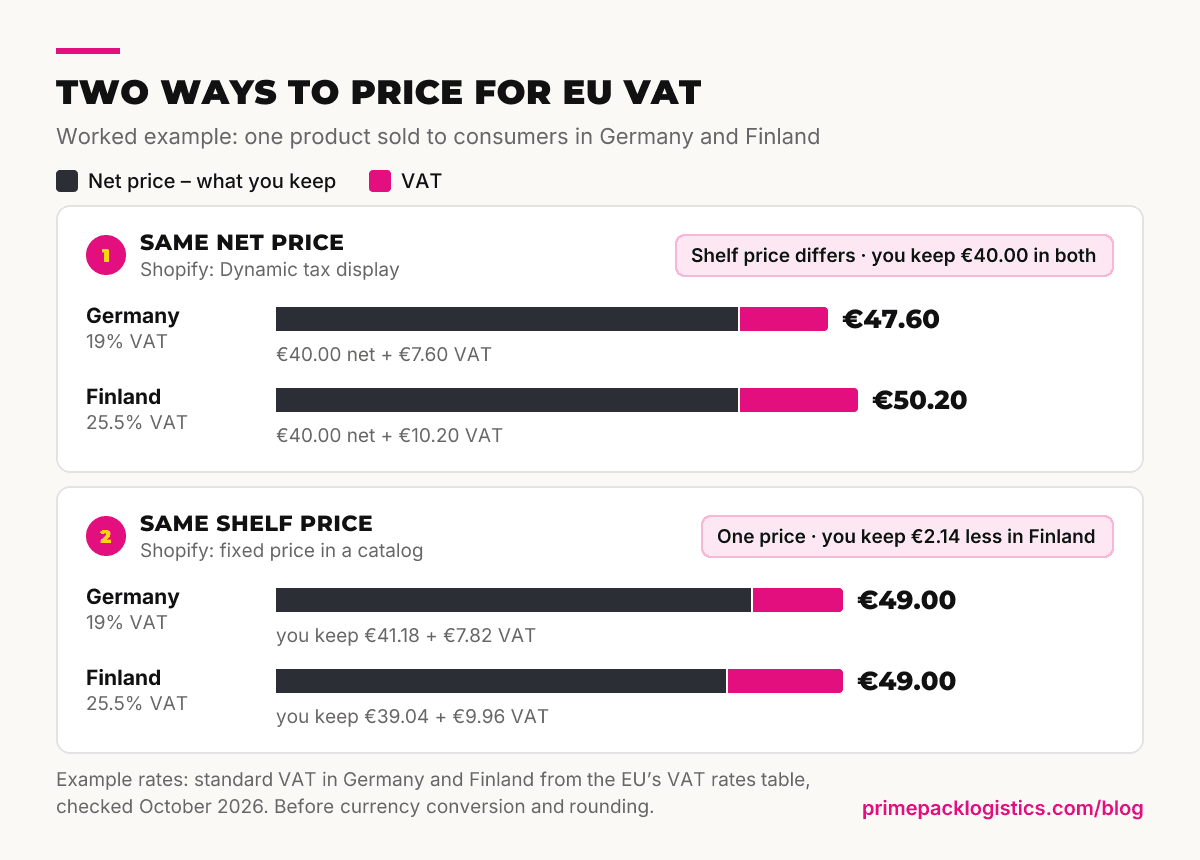
| Pricing approach | Germany (19% VAT) | Finland (25.5% VAT) |
|---|---|---|
| Same net price (Dynamic tax display) | €40.00 + €7.60 VAT = €47.60 | €40.00 + €10.20 VAT = €50.20 |
| Same shelf price (fixed catalog price) | €49.00, including €7.82 VAT – you keep €41.18 | €49.00, including €9.96 VAT – you keep €39.04 |
Same net price. With Dynamic tax display and prices that exclude tax, Shopify adds the customer's VAT to your price: €47.60 in Germany, €50.20 in Finland. Your margin is the same in both countries; the shelf price isn't.
Same shelf price. Set a fixed euro price in a catalog for your EU market, and Shopify charges exactly that amount – it doesn't adjust specific prices per region. The VAT inside €49.00 follows Shopify's tax-inclusive formula, tax = rate × price ÷ (1 + rate): €7.82 in Germany and €9.96 in Finland. You keep €2.14 less per sale in Finland.
Neither is wrong. One price across the euro area is easier to advertise; a fixed net price protects your margin where VAT is highest. You can also mix them, with fixed prices for best sellers and Dynamic pricing for the rest. Rates move, so check them before you set prices: Sweden cut VAT on food from 12% to 6% on 1 April 2026, until 31 December 2027, according to Skatteverket, which points sellers to the European Commission's Taxes in Europe Database for current rates.
How do you set up EU VAT in Shopify when your stock is in Sweden?
Add two VAT registrations under Settings > Taxes and duties > European Union: your Swedish VAT number for orders within Sweden, and an OSS registration in Sweden for orders to other EU countries. In Shopify's EU tax reference, a local registration covers orders into that country, an OSS registration covers cross-border orders, and you still need the local registration when you use OSS. That mirrors the two returns you file.
| Registration in Shopify | Orders it covers | Where the VAT is reported |
|---|---|---|
| Local registration: Sweden | Orders to customers in Sweden | Your Swedish VAT return |
| OSS registration: Sweden | Orders shipped from Sweden to other EU countries | Your One Stop Shop return, in euros |
| Micro-business (home country registration) | Cross-border orders at your home rate, up to €10,000 a year | Not for you – the threshold doesn't apply to businesses established outside the EU |
Registrations come before settings
If you sell to consumers from stock in Sweden, you normally register for VAT in Sweden, and brands based in the US, Canada, Australia or the UK should plan for a VAT agent approved by the Swedish Tax Agency. You then register for the One Stop Shop in Sweden with your Swedish VAT number. If your business is the importer, aim to be registered before your first bulk shipment clears customs, so the import VAT can go through your Swedish return. Our EU VAT guide for non-EU sellers covers each step.
Shopify Tax or Basic Tax?
Shopify's EU tax setup guide says OSS works only with Shopify Tax or Basic Tax, and that Basic Tax is available in the EU only to stores that were set up to collect tax there before 13 May 2026. If your store starts collecting EU tax now, that means Shopify Tax, which is free up to a sales threshold and then charges a fee per order. In the cross-border section, choose Collect using a One Stop Shop (OSS) registration, select Sweden and enter your VAT number.
Three settings that trip up non-EU stores
- The micro-business option. It charges your home rate on cross-border sales up to €10,000 a year. That threshold only helps sellers established in a single EU country. For a business established outside the EU, the customer's VAT applies from the first sale.
- The fulfillment location. OSS registrations don't apply when the selected fulfillment location is outside the EU, so EU orders need to be fulfilled from your Swedish stock.
- The shipping zone. Shopify's troubleshooting list names a missing EU shipping zone as one reason VAT isn't charged, so set up a zone for the EU instead of relying on Rest of World.
Shopify calculates and collects the VAT, but its setup guide leaves filing and paying it to you: the Swedish return and the One Stop Shop return are still yours to file.
How do you handle reduced VAT rates in Shopify?
With product categories if you use Shopify Tax, or with tax overrides on a collection. Many EU countries tax products such as food, books or children's clothing at reduced rates, and the rate depends on the destination country.
- Product categories. With Shopify Tax, a product's category in Shopify's Standard Product Taxonomy sets its VAT rate for each destination country. Shopify suggests categories, but checking them is your responsibility – a wrong category means charging too much or too little VAT.
- Tax overrides. You add the products to a collection by hand and set a rate per region. The percentage you enter is the amount to be collected, not the amount exempted, as Shopify warns. An override takes precedence over a product category, so remove old overrides that conflict with your categories.
Test before you go live. Shopify suggests a draft order with a customer address in the destination country: check the tax breakdown for Sweden, Germany and at least one more EU country, for each type of product you sell.
Do EU customers pay duties when you ship from Sweden?
No – not on orders shipped from stock that was imported in bulk and cleared in Sweden before it was sold. Those orders aren't imports, so there are no import duties to collect at checkout, IOSS doesn't apply, and neither does the flat duty on low-value parcels. Customs duty and import VAT were due once, when the bulk shipment was cleared. One condition: it has to be genuine stock. Goods already sold to individual customers before import don't count, even if they ship together.
So keep duty collection off for the EU markets you serve from Sweden. Shopify's duty collection estimates what customs will charge on international orders, and its troubleshooting list names an active duties setting as one reason VAT isn't charged on EU orders.
What if some EU orders still ship from outside the EU?
Then Shopify's two VAT routes collide. Its EU tax reference uses this exact case – a location in Sweden and one in the United States – and says that using OSS and IOSS at the same time isn't supported: once you enter your OSS registration, collecting VAT through IOSS on orders shipped from outside the EU is disabled. Parcels sent without IOSS have their VAT charged at import, often collected from the customer by the carrier before delivery. Since 1 July 2026, parcels worth up to €150 sent directly to EU consumers from outside the EU also pay a temporary flat customs duty of €3 per item type.
The clean fix is to sell EU customers only what you stock in Sweden, since a catalog controls which products each market can buy. Our IOSS guide covers the parcel-by-parcel route; for the stock route, see why one EU warehouse can serve every EU country.
Shopify Markets EU setup checklist
Eight steps: registrations first, then Shopify's locations, markets, taxes, prices and duties, then a test.
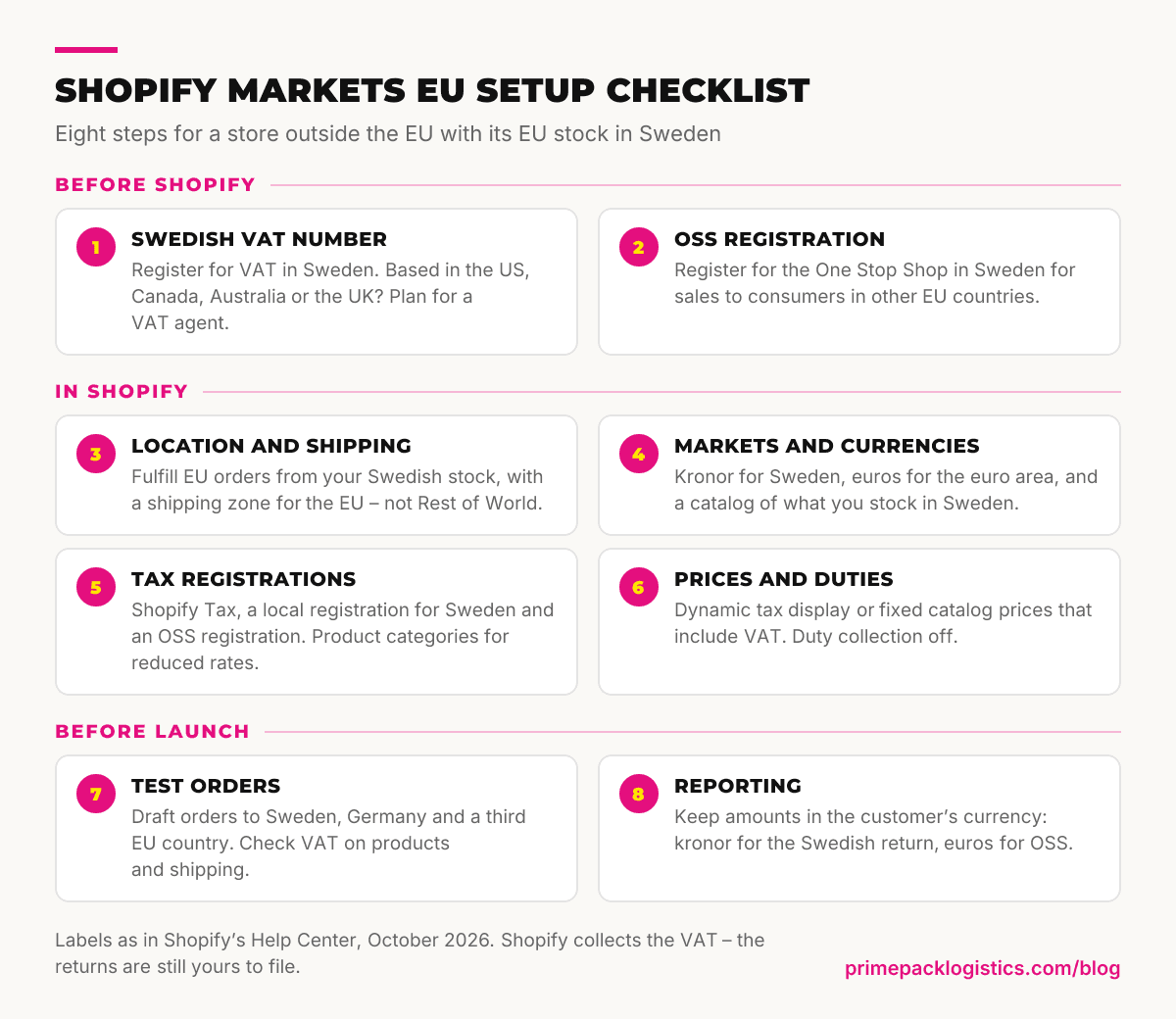
- Register for VAT in Sweden and plan for a VAT agent.
- Register for the One Stop Shop in Sweden.
- Fulfill EU orders from your Swedish stock, with a shipping zone for the EU.
- Set up markets: kronor for Sweden, euros for the euro area, a catalog of what you stock in Sweden.
- Add Shopify Tax, the Swedish and OSS registrations, and product categories.
- Choose Dynamic tax display or fixed catalog prices, and keep duty collection off.
- Place draft orders to Sweden, Germany and a third EU country, and check the VAT.
- Report from amounts in the customer's currency: kronor for Sweden, euros for OSS.
Your storefront has EU consumer rules to meet too. Since 19 June 2026, they include an online withdrawal function – see what the EU withdrawal button means for your store.
FAQ
Is Shopify Markets available on every plan?
Yes. Regional markets are free on all plans, and per-market currencies, catalogs and duty and tax settings are available on every plan. Per-market theme customization needs Advanced or higher.
Do I need Shopify Tax to use OSS in Shopify?
Yes, unless your store was set up to collect tax in the EU before 13 May 2026 and uses Basic Tax. Shopify's OSS setting works only with one of the two.
Does the €10,000 threshold apply to my store?
No, not if your business is established outside the EU. Charge each customer's VAT rate from the first sale.
Do I need IOSS if my stock is in Sweden?
Not for orders shipped from that stock. They go in your Swedish VAT return and your One Stop Shop return instead.
Should shipping charges include VAT?
Yes. Delivery charges you bill the customer are part of the taxable amount, and Shopify's tax-inclusive setting covers both the product price and the shipping rate.
When your Shopify store is ready for EU stock, ask us for a quote based on your products and the markets you sell to.